Remapping “§±” key to “`~” (tilde) key on Mac computers
September 13, 2025
ISO layout has one annoyance to me, which is the *§*key, located to the left from numeric 1 key:
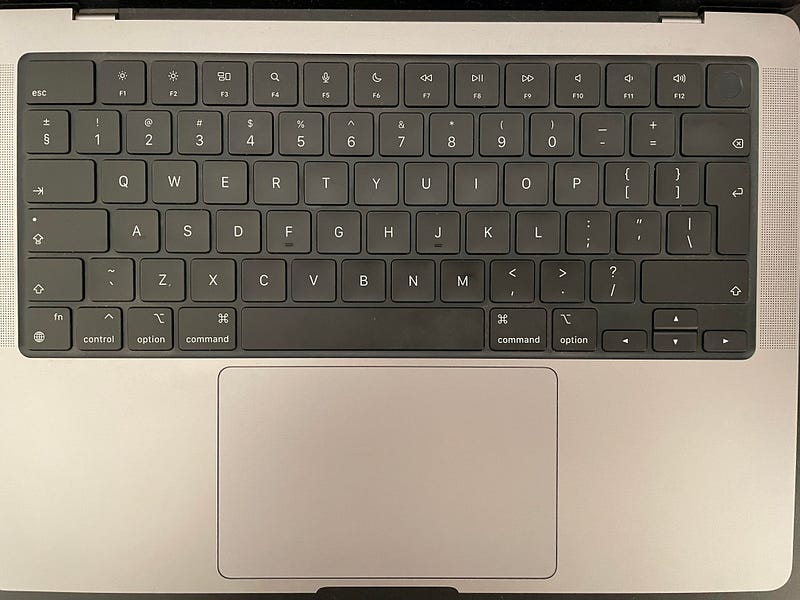
Anyone, who had worked with ANSI keyboards, had used to see the ~ key instead. ~ key is used in a lot of macOS shortcuts, such as CMD+~ to switch between the windows of the same program, \`` symbol used to quote code in markdown and various messengers such as Slack, so that having it near left Shift` on ISO keyboards is very impractical.
Googling had shown that there is a software, called Karabiner Elements, capable of remapping the key, and this software was the first solution of the author. But Karabiner Elements is a third-party software, that needs to have a permissions to grab all user keystrokes, consumes RAM and place in the system tray, which kind of not very good. Turns out that this problem can be solved with a built-in utility called hidutil, which accepts the configuration for remapping the keys from source to destination. Format of the call is:
hidutil property \
  --set'{"UserKeyMapping":[{"HIDKeyboardModifierMappingSrc": src,"HIDKeyboardModifierMappingDst": dst}]}'
Where src and dst are the key codes, that can obtained on the old Apple Developer page, but it did not list all the codes. With some experimentation I found that the code of the §± key is 0x700000064, so that remapping script looks like:
hidutil property \
  --set '{"UserKeyMapping":[{"HIDKeyboardModifierMappingSrc": 0x700000064,"HIDKeyboardModifierMappingDst":0x700000035}]}'
Bonus: I also like to remap the Caps Lock key to the Backspace (Delete). You would be surprised but this has a massive productivity boost, since the hand doesn’t need to move in the top right corner each time something needs to be deleted, now it’s just a small movement of a pinky finger.
So the full script looks like:
# https://developer.apple.com/library/archive/technotes/tn2450/_index.html
# 0x700000039 – Caps Lock
# 0x70000002A – Backspace
# 0x700000064 – Key to the left of 1 on ISO keyboards (§±)
# 0x700000035 – Tilde (`~)

hidutil property \
  --set '{"UserKeyMapping":[{"HIDKeyboardModifierMappingSrc":0x700000039,"HIDKeyboardModifierMappingDst":0x70000002A},{"HIDKeyboardModifierMappingSrc": 0x700000064,"HIDKeyboardModifierMappingDst":0x700000035}]}'
Making the script automatically loadable upon the system boot
You can execute this script in the Terminal and it will change the behavior of the keys. There are multiple ways to load something during the boot, I’ve chosen the Automator utility, and saved the script in the iCloud, since I need it on multiple computers:
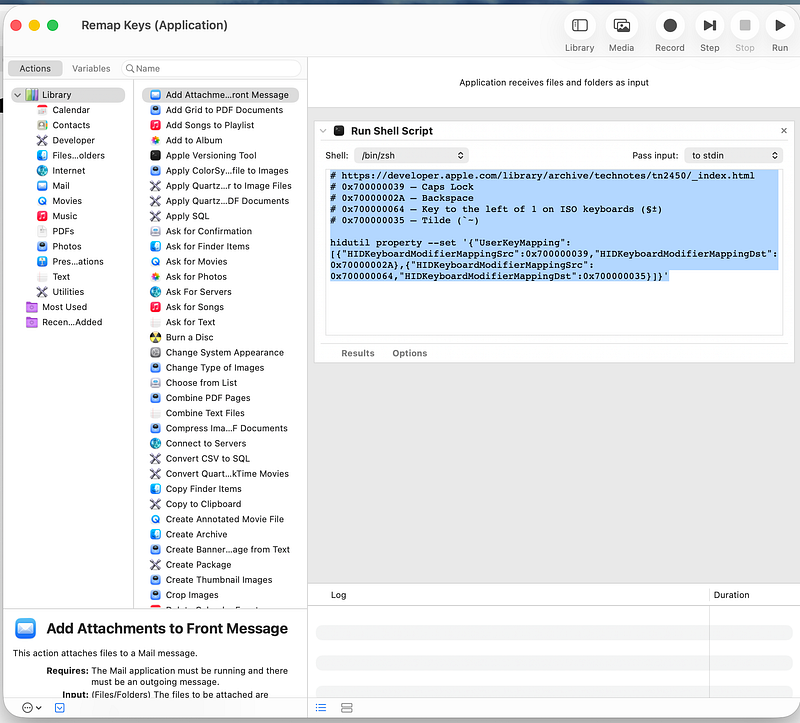
- Run an Automator utility, choose the folder to store the script.
- Add “Run Shell Script” action and paste the script into it
- You can test it by running it already
- To make it bootable, open “Login Items & Extensions” system settings page and drag the file into it:
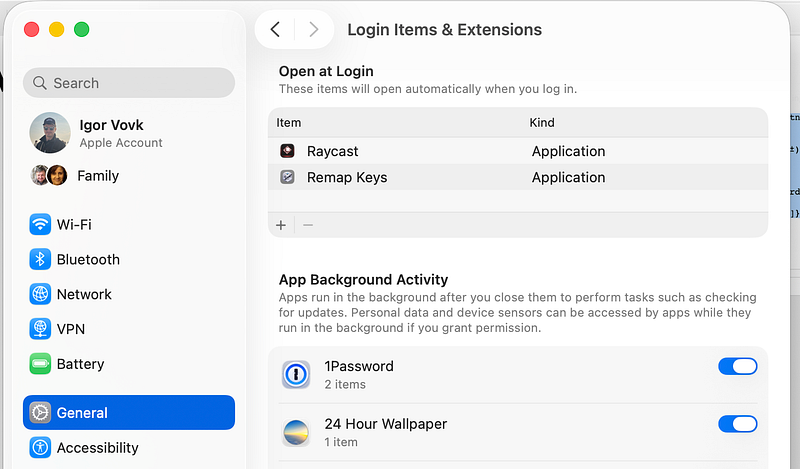
That’s it! Now upon reboot remapping configuration will be applied automatically.
I hope you found this information helpful.